Before you start
- Alphaxis running with the intended account connected.
- A Telegram bot token and the chat ID you want to authorize.
- A Trade PIN configured for protected trading actions.
Step-by-step setup
Configure the bot connection
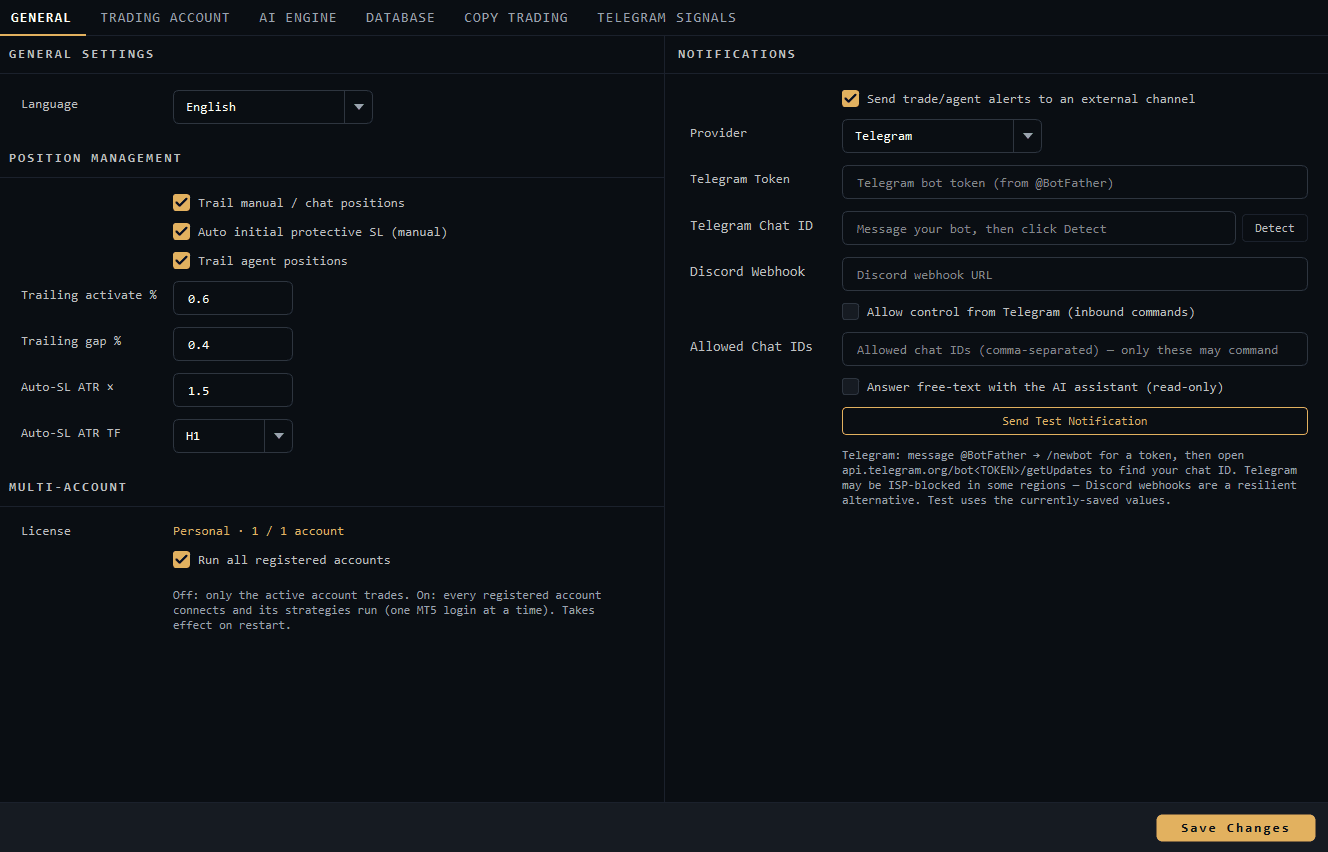
Open Settings > General and locate Telegram notification and control settings. Enter the bot token and chat ID in the application. Use Detect where available to identify the chat. Keep the token private and save your changes before testing.
Restrict authorized chats
Enable Allow control from Telegram and set allowed chat IDs explicitly. Save the control settings. Incoming chat IDs are checked against this allowlist. Do not authorize unknown chats or public groups just to make a test work.
Test a read-only interaction
Use Send Test Notification to check outbound messaging. Then send a supported read-only status or positions command through the bot. A received notification alone does not prove inbound control is enabled or that the chat is authorized.
Review protected actions
For a supported trading action, check the active account, instrument and requested operation, then follow Trade PIN confirmation. Personal controls its supported single account. Copy trading and concurrent multi-account workflows require Pro.
Checks and troubleshooting
- If notifications work but commands do not, inspect the control toggle and allowlist first.
- Restore the desktop application and MT5 connection if either has stopped.
- Remove unused chat permissions and disable inbound control when it is not needed.
Requirements and limitations
- Remote control does not replace the separate Telegram Signals channel setup.
- Trade PIN protects supported money-moving commands; not every incoming message is an executable instruction.
- Never share a bot token, account password or Trade PIN in a public support request.
Trading financial instruments carries a high level of risk and can result in the loss of all invested capital. Alphaxis AI is analysis and execution software, not a financial adviser. It does not guarantee profit, accuracy, or any trading outcome. Risk Disclosure