What is an AI trading assistant for MT5?
An AI trading assistant for MT5 adds analysis and workflow tools around a MetaTrader 5 account. Alphaxis AI can summarize chart and market context in plain language. Traders review the output and remain responsible for decisions.
How does Alphaxis AI work?
Connect the standard MT5 terminal, configure the available account and risk settings, then use the relevant analysis or trading workflow. AI assistant requests use a supported provider and API key that you supply. Review the analysis before taking action; supported execution and automation remain governed by your configuration.
Supported trading features
The product includes AI-assisted market analysis, MT5 order and position management, strategy building and backtesting, Telegram signal workflows, monitoring, and risk controls. Feature availability can depend on edition and setup; consult the feature pages and product guides for specifics.
AI assistant vs a traditional Expert Advisor
A traditional MT5 Expert Advisor generally implements coded rules that can execute through the terminal. An AI assistant adds a language-based analysis interface, but it is not automatically a replacement for an EA and its output can be wrong. Alphaxis combines analysis and configurable trading workflows; review each action and test strategies before live use.
Setup, requirements, risks, and limitations
Alphaxis AI runs on Windows and requires the standard MetaTrader 5 terminal plus a broker account with MT5 access. AI assistant features require your own supported AI provider account and API key. Trading involves risk; AI output may be incomplete or incorrect, backtests do not predict future results, and no profitability is guaranteed. Start with a demo account and read the risk disclosure.
Frequently asked questions
Does Alphaxis AI guarantee profitable trades? No. Does it need MT5? Yes, it works alongside the standard MT5 terminal. Does the assistant trade autonomously? AI analysis is an aid; configured execution workflows and approval controls determine what happens. Which AI provider is used? You configure a supported provider and your own key.
How the Alphaxis workflow fits together
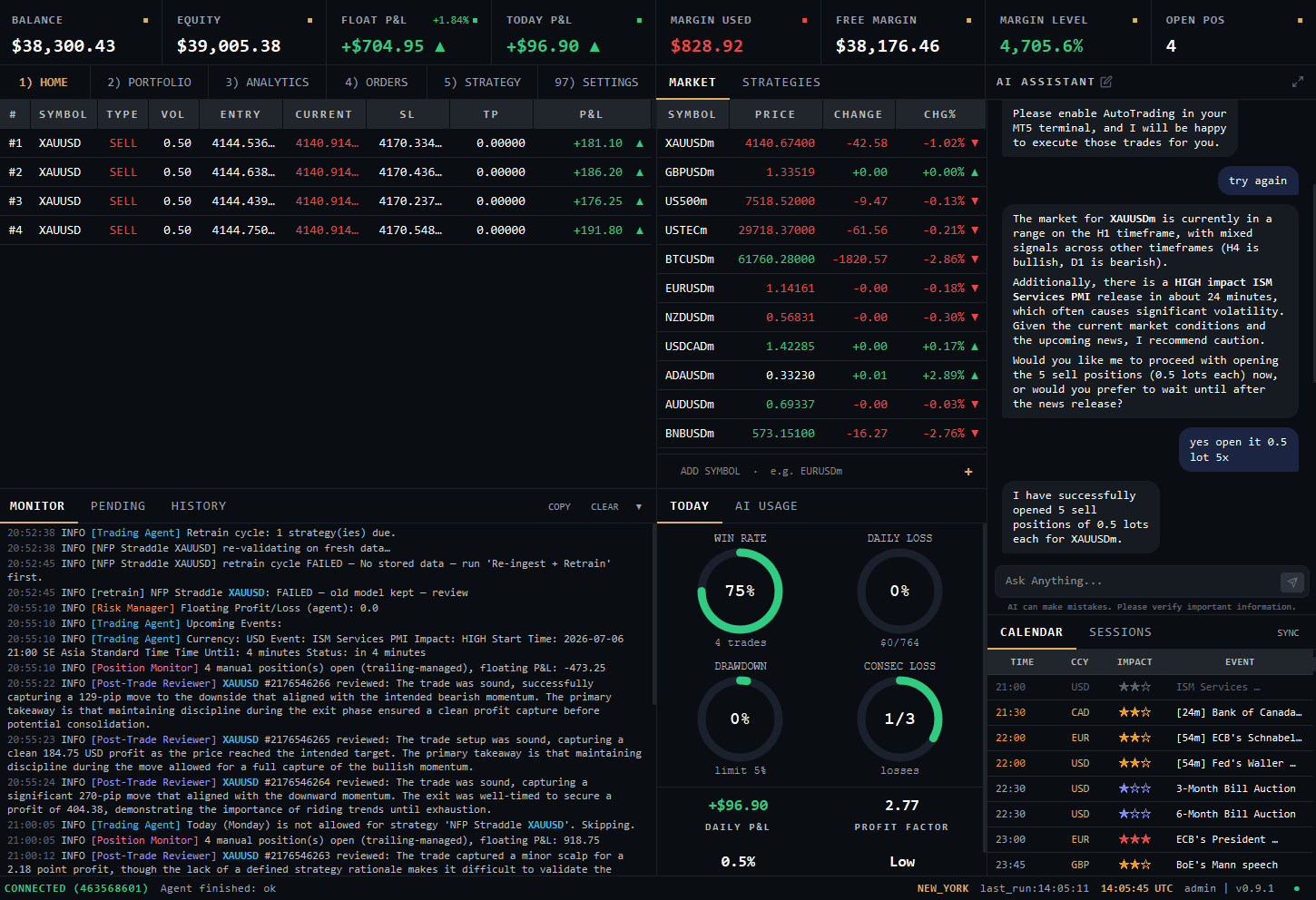
Alphaxis is a Windows desktop workspace that connects to the standard MetaTrader 5 terminal and broker account. The manual describes a dashboard for positions, account metrics, strategies, market watch, an agent chat, performance panels, and calendar or session context. This is useful because market analysis is only one part of operating an account: a trader also needs to know which account is active, what positions are open, and what risk settings apply.
The AI assistant accepts plain-language questions and can summarize chart and market context using the configured AI provider. The product does not include a shared AI subscription: users configure their own supported provider and API key. Treat the response as analysis to inspect. AI output can be incomplete, outdated, or wrong, so verify symbols, timeframes, assumptions, and source data before using it to inform a decision.
Assistant analysis and automated execution
Asking Alphaxis AI to explain a chart is different from activating a strategy or starting the automated agent. The assistant can summarize market context; it does not mean a strategy is enabled. The manual states that money-moving actions initiated in AI chat require a Trade PIN. Automated strategy activity separately depends on the selected account, strategy settings, strategy status, agent state, and any active risk guard. Check the status indicators and activity log so you can see which workflow is operating.
Before using the product, connect and verify the intended MT5 account, review the AI Assistant setup and provider-key requirements, then inspect the available analysis and approval controls. The MT5 connection guide, AI Assistant guide, and AI Trading feature overview explain those steps in detail.
What to verify before choosing an AI trading assistant
Check whether the product requires a desktop terminal, which operating system it supports, how AI-provider billing works, and whether the AI can execute actions or only explain data. Ask how order size and exposure are controlled, whether operations are logged, and which workflows require explicit approval. Confirm that a tool supports your broker’s MT5 setup and that its feature availability matches your edition. Alphaxis requires Windows and a standard MT5 terminal; assistant use requires your own supported provider account and key.
Evaluate the actual workflow with a demo account. Check that the instrument mapping is correct, the active account is the one you expect, and the displayed position and risk information matches MT5. Use a small, clearly defined test question and compare the answer against the chart and relevant market data. Do not use a confident tone, a polished screenshot, or a historical result as evidence that an AI system predicts future price movement.
Frequently asked questions about AI trading for MT5
Can AI build a strategy? Alphaxis includes an AI Builder that can draft indicators and rules for supported Model or Rule strategy types; the manual instructs users to inspect the preview and validation before saving. Is that draft ready for live trading? No: verify the symbol and parameters, test it, and meet the training and deployment steps required for the strategy type. Does Alphaxis guarantee profits? No. Is an internet AI provider included? No; users configure their own supported provider and API key. Can I use several accounts? Edition quotas apply; Pro includes up to five accounts and copy trading according to the public editions description.
Common questions about AI Trading MT5
Does Alphaxis AI place trades by itself?
AI market analysis is decision support. Execution depends on the configured strategy or workflow, the agent state, and your controls. Money-moving actions started from AI chat require a Trade PIN.
Do I need MetaTrader 5?
Yes. Alphaxis AI is a Windows desktop workspace that connects to the standard MetaTrader 5 terminal and a broker account with MT5 access.
Which AI provider is included?
Alphaxis does not bundle a shared AI subscription. You configure your own supported provider account and API key for assistant features.
Can I configure the strategy timeframe and schedule?
Yes. Strategy settings include timeframe, trading days, trading hours, direction, risk percentage, maximum lot, and maximum positions.
Does Alphaxis AI guarantee trading profits?
No. AI output can be wrong or incomplete, backtests do not predict future results, and trading involves risk.
Trading financial instruments carries a high level of risk and can result in the loss of all invested capital. Alphaxis AI is analysis and execution software, not a financial adviser. It does not guarantee profit, accuracy, or any trading outcome. Risk Disclosure