Define the rules first
Write down entry, exit, sizing, and risk rules before testing. Clear rules make results easier to interpret and reduce accidental tuning to historical data.
Configure and review the test
Select the strategy inputs and historical period available in the product, run the test, then inspect trades and performance measures in context. Confirm data quality and assumptions.
Avoid overfitting
Repeatedly changing rules to maximize one historical result can produce fragile strategies. Consider separate periods and realistic costs where supported, and validate behavior on a demo account.
Limitations
A backtest is only as useful as its data and assumptions. It does not guarantee live execution quality, future returns, or protection from market events. Trading involves risk.
What Alphaxis strategy testing includes
The Strategy workspace lets users create and edit strategies with a name, trigger type, symbol, timeframe, maximum lot, direction, maximum positions, risk percentage, trading hours and days, high-impact news behavior, and an active toggle. Trigger types described in the manual include Model, Rule, Breakout, Pattern, and Calendar. AI Builder can draft indicators and rules for supported Model or Rule types; the generated preview should be reviewed and validated rather than treated as an approved strategy.
Testing paths vary by type. Model strategies use historical data ingestion and retraining, validation, backtesting, and deployment steps; the manual states they must be trained, backtested, and deployed before the agent trades them. Deterministic Rule, Breakout, Pattern, and Calendar strategies use the applicable Explore/out-of-sample workflow. Follow the workflow presented by the application version you use.
A repeatable test procedure
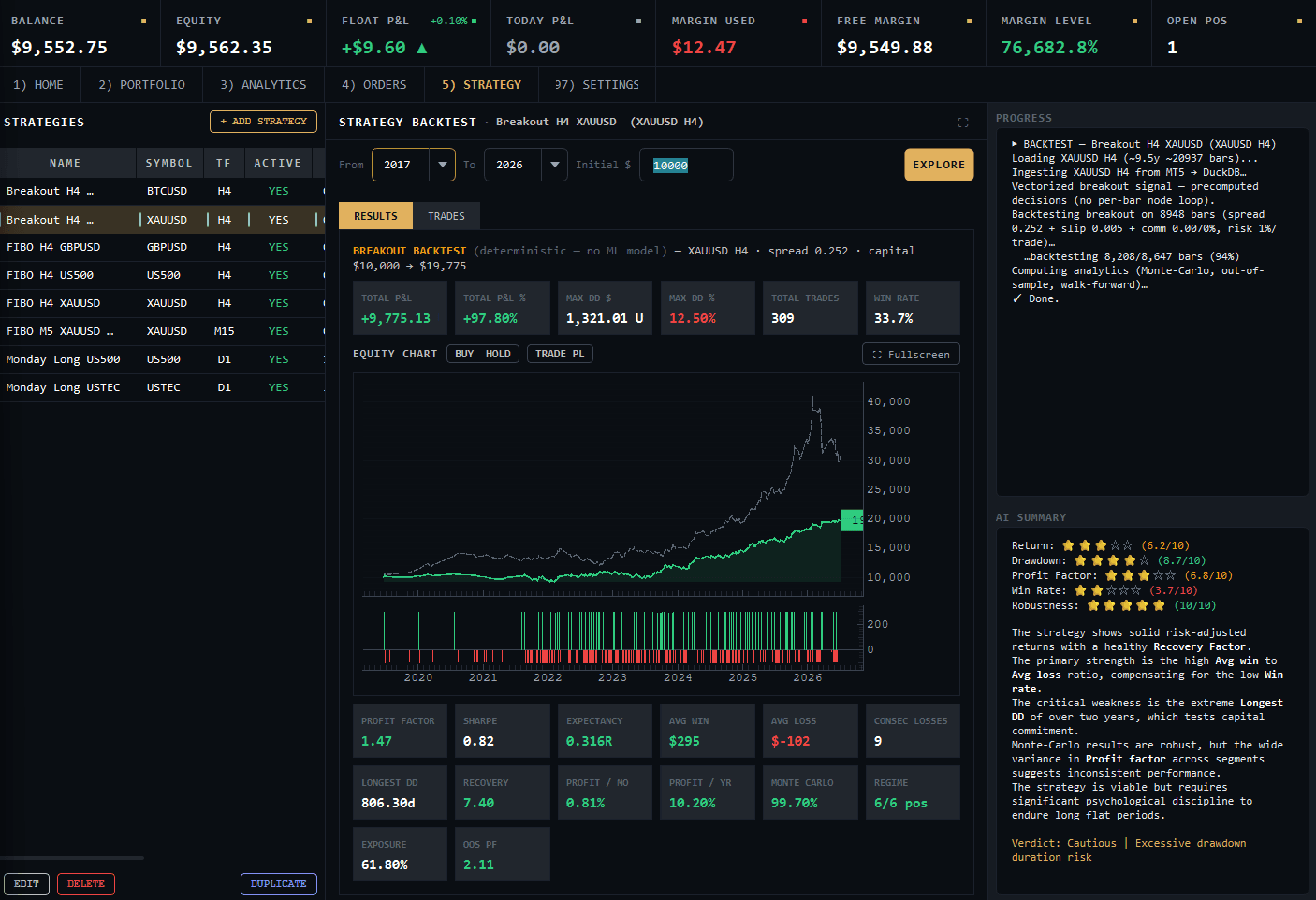
1) Define rules before looking for the best result. Specify entry, exit, direction, timeframe, risk, hours, and symbol. 2) Verify the broker symbol; an instrument may have a broker-specific suffix. 3) Choose a historical period and document the settings. 4) Run the appropriate train, validate, backtest, or Explore step. 5) Inspect the progress log for errors and confirm that the intended test completed. 6) Review the equity curve, drawdown, trade list, and summary KPIs together. 7) Repeat with a separate period or demo environment before considering live deployment.
A single metric such as profit factor or win rate can hide important details. Inspect sample size, consecutive losses, drawdown depth, average trade, period coverage, and whether the test reflects realistic broker costs and execution assumptions. If a change improves one period but degrades another, that may indicate overfitting rather than a robust improvement.
Interpret results without overclaiming
A backtest is a historical experiment under chosen data and assumptions. It is not a forecast, independent audit, or promise of future returns. A test can be distorted by incomplete data, look-ahead bias, too many parameter searches, unrealistic spreads or commissions, and differences between simulated and live execution. Record the period, strategy version, settings, symbol, timeframe, and data assumptions whenever you compare results. Compare like with like and retain losing trades in the evaluation.
After testing, use a demo account to examine operational behavior: order sizing, symbol resolution, allowed hours, news rules, agent status, and logs. Model strategies must complete their documented deployment path; a successful historical test alone does not mean the strategy is deployed or active. Strategy activation and starting the automated agent are separate decisions.
Common problems and next steps
If a test produces no trades, check that the symbol is available, the selected date range contains usable data, the entry rules can trigger on that timeframe, and allowed hours or days are not excluding the period. If a Model strategy cannot be deployed, confirm that training, backtesting, and validation stages completed successfully. If results seem inconsistent, compare the focused account, symbol mapping, period, and strategy inputs. The Strategy guide documents the in-product sequence; contact support with the version, strategy type, symbol, timeframe, period, and relevant error text when needed.
For background on how Alphaxis handles other workflows, see the backtesting feature overview and the risk management guide. Evaluate every result in the context of risk, data quality, and execution limits.
Trading financial instruments carries a high level of risk and can result in the loss of all invested capital. Alphaxis AI is analysis and execution software, not a financial adviser. It does not guarantee profit, accuracy, or any trading outcome. Risk Disclosure