Before you start
- An Alphaxis Pro license.
- At least two configured MT5 accounts, each with its own checked terminal path and connection.
- An understanding of instrument specifications and risk settings on the source and follower accounts.
Step-by-step setup
Prepare both accounts
Add accounts under Settings > Trading Account. Test each connection and inspect its symbols. A follower needs its own valid connection; selecting a master does not connect the follower automatically.
Create a relation
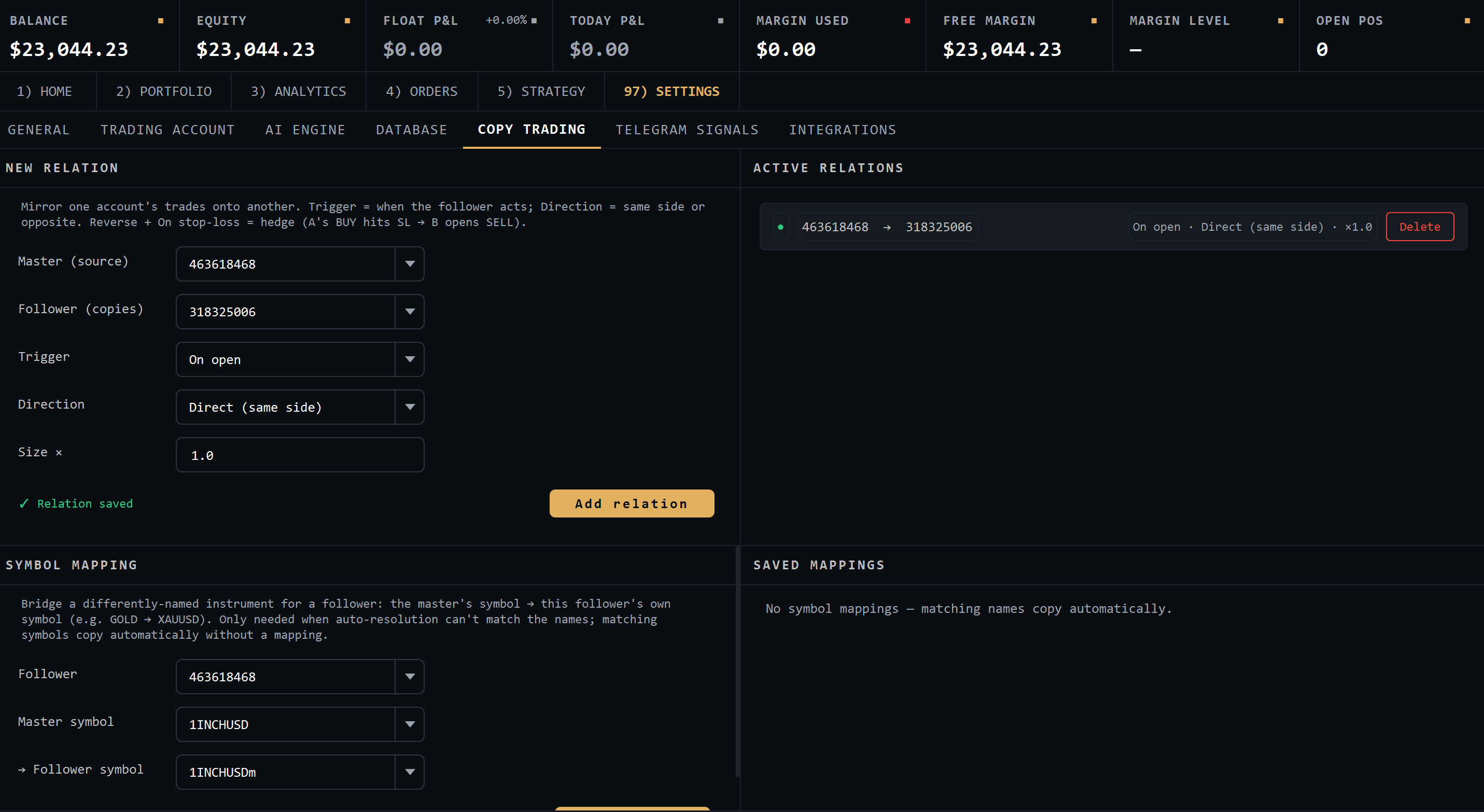
Open Portfolio > Copy Trading or Settings > Copy Trading. Add a relation and select the master as source and follower as destination. Confirm the direction of the link before saving.
Choose trigger and direction
Choose the supported event: on open, on stop-loss or on take-profit. Direct uses the same trade direction; reverse uses the opposite. A stop-loss-triggered relation is different from continuously mirroring all positions.
Set sizing and inspect execution
Configure the multiplier and review follower risk settings. Save the relation and inspect the relation list or topology. If brokers use different instrument names, review symbol resolution or the available symbol mapping controls. Validate in a demo environment first.
Checks and troubleshooting
- Inspect follower orders and logs; a saved relation is not proof that an order executed.
- Use available pause or removal controls to stop future copying.
- Review existing positions separately when changing a relation; changing configuration does not itself close a trade.
Requirements and limitations
- Accounts can have different equity, lot constraints, prices and fills.
- Reverse copying or stop-loss triggers do not eliminate losses or guarantee an effective hedge.
- The required account processes and terminals must run. Pro supports up to five enabled accounts; Personal does not unlock this workflow.
Trading financial instruments carries a high level of risk and can result in the loss of all invested capital. Alphaxis AI is analysis and execution software, not a financial adviser. It does not guarantee profit, accuracy, or any trading outcome. Risk Disclosure